Implementing Salesforce CI/CD using Azure DevOps
BY: MATEJ ĐANIĆ, SALESFORCE SYSTEM ARCHITECT
Abstract
Implementing a continuous integration and delivery strategy within development environments is crucial for maintaining agility and reliability in software delivery. In this article, I guide you through configuring a robust CI/CD pipeline for your project drawing on our experience with Azure DevOps as a version control and project management platform. The proposed solution is suitable for small to medium agile teams working on a non-trivial Salesforce project.
The strategy aims to integrate best practices into the development lifecycle by refining our definition of done. Enforcing stringent validation in the projects’ earliest stages with required unit tests on every change, guaranteed the stability of our implementations.
Similarly to introducing coding standards in a team, we in Triple Innovations emphasize the need for every member to be involved in the pipeline design phase and to provide crucial feedback and ideas for potential improvements to the process. Investing in a good structure and cohesiveness gave us the ability to focus on the actual solutions that we were building without being restricted by a policy no one understood or wanted to follow.
Process
Before diving into a project, it is crucial for a team to establish a clear development process. In the context of IT projects, there are many parts of that process which take place during its course. First, you pick a methodology. Do you use waterfall or go full on agile? What time should you hold the daily stand-up meeting? What should you discuss on it, and more importantly, how long should it last? At some point, you either agree on the new and improved way of doing things or you just get tired and do what you’ve always done.
Sooner or later, you get to the point where someone expects that you start “actually” working on the project and stop endlessly discussing it. But without a clearly defined process in place, a project is almost surely doomed to fail or at the very least, break a few deadlines. When it comes to CI/CD, there is no one-size-fits-all, some options favour smaller teams, others larger. Some are too specific and can’t be applied to your circumstances, others are too generic and achieve very little in optimizing your work.
You obviously agree to use Git, but what branching model or versioning strategy do you implement? What about testing, are there dedicated environments for functional or user acceptance testing? This just raises more questions and becomes a process within a process.
Here’s how we did it in one of our most recent projects.
Our CI/CD Journey
Without going into many details, the project consisted of an integration between Salesforce and an external system. We had the unique opportunity of having enough time before the project started to plan ahead, so we took advantage of that. We invested time in setting up the environments and pipelines, so that everything was ready when development started.
Never underestimate the time investment of educating everyone on the process itself. There is nothing worse than following a process you don’t understand. It can lead to restricting a person’s creativeness, which is not in anyone’s interest. The process should in fact serve the team, not the other way around.
Whenever a new member joins the team, we recommend that you hold a knowledge transfer session exclusively about the process. New members will quickly catch on and be able to contribute in no time, and current members will get a nice refresher in case some things were starting to get kind of blurry.
Environments
We decided on having a single centralized org, designated for Quality Assurance (QA) with every team member having their own dedicated development org as well. Since the project itself did not yet have an actual production environment, we considered QA as our production.
Changes were never directly done on that org, only deployed via automated pipelines. This ensured that anyone could take the current version of that environment and safely deploy it to their own org, similar to a sandbox refresh.
Branching model
We adopted the following branching model:
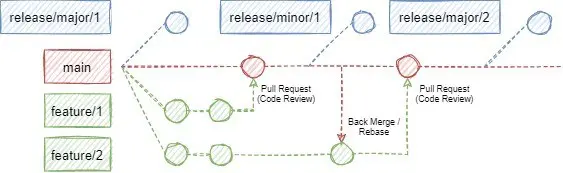
Our main branch represents the current (working) state of the project, ready to be deployed to an environment at any time. Nothing can be directly pushed to this branch, it is only accessible through Pull Requests.
Release branches signify various project states which were at some point deployed to our QA org. We distinguish only two release types, major and minor. Minor releases were done for smaller changes when features or bugfixes were ready to be tested by our QA team. We started doing minor releases once per week and slowly transitioned to a when-needed basis as the project progressed.
On the other hand, we considered major releases as bundles of features that make a larger, mostly independent segment of the project. These releases are considered the most stable and served as a backup when we needed to roll-back some recent changes.
Branches with the feature prefix are exactly what their names suggest, collections of changes providing business value to the product. Usually, we created a feature branch per user story in DevOps but opted to a per-task format when deemed necessary to evenly distribute the code review effort into many smaller chunks. No one wants or has the time and concentration to look at a PR with a few hundred new and even more modified or removed lines of code.
Deployment pipelines
For every Pull Request to the main branch, a “check-only” deployment is executed on the QA org, validating the deployment without actually committing any changes. The validation executes all unit tests in the org which meant that no PR could be completed without passing all tests first. Additionally, it enforced the Salesforce’s 75% code coverage check as well. Having this verification from the very beginning was crucial as we couldn’t just postpone unit testing until we were finished with the development.
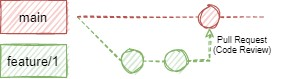
Moreover, Pull Requests are an ideal opportunity to perform code reviews, making sure that everything is implemented according to industry (and team) standards each step of the way. Our definition of done was no longer “it works”, but more so “it works, all tests pass and it is reviewed and ready for deployment”. This helped clean up our code from the get-go and meant that less work was necessary in the later stages of the project.
When changes were made in different feature branches that dealt with the same file, in most cases, a merge conflict had to be resolved in order for the change to reach the main branch successfully. As a smaller team (at most 4 people at a time), we were flexible enough to make use of both back merging and rebasing changes from main to feature branches. We used whichever option was more appropriate at the time based on the simplicity of the changes and the level of conflict they had.
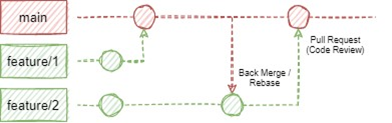
But how do we get to production? Easy, we just create a release branch.

Whenever a release branch is created from the main branch, the previously verified deployment is now re-deployed, this time without the check-only flag, therefore being committed to the QA org.
To summarize, nothing goes to the main branch without a review, successful test execution and a minimum of 75% of code covered by unit tests. The path to production is no longer unnecessarily complicated and problems with rolling back changes were a thing of the past.
As far as reviews go, we always opted for peer reviews, meaning that any team member excluding the author could perform the review, regardless of seniority. We viewed this as an excellent opportunity that not only offered the advantages of validating development standards, detecting bugs or performing sanity checks but also served educational purposes. This implied that the reviewer could potentially learn something new, even if they didn’t directly work on the piece of code.
Guide
For those without access to a Sandbox environment, you can always register a Developer Edition org here. They are free of charge and unlike Trailhead playgrounds, they don’t expire.
Create a Permission set with deployment permissions
Licence: Salesforce API Integration
Add the following System Permissions:
Author Apex
Modify All Data
Modify Metadata Through Metadata API Functions
Create a new User
Licence: Salesforce Integration
Profile: Salesforce API Only Systems Integration
Assign the newly created permission set
Create a Digital Certificate by following this guide
Create a new Connected App
Set Enable OAuth settings to true
Add the Selected OAuth Scopes:
Access the identity URL service (id, profile, email, address, phone)
Manage user data via APIs (api)
Manage user data via Web browsers (web)
Perform requests at any time (refresh_token, offline_access)
Callback URL: http://localhost:1717/OauthRedirect
Set Use digital signatures to true
Upload the server.crt file
Write down the Consumer Key
Manage the Connected app
Edit Policies
Set Permitted Users to Admin approved users are pre-authorized
Manage Profiles
Add the Salesforce API Only Systems Integration profile
Create a Git repository in Azure DevOps
Enable Pipelines
Configure the pipeline:
Create the following variables
CONSUMER_KEY: value from Connected app
USERNAME: Username of the integration user
ALIAS: Alias of the integration user (from User Detail)
TARGET_URL: salesforce.com URL of the org
Create the azure-pipelines.yml file in the root directory
In our experience, there were instances when the NodeTool installation seemed to stall indefinitely, so we implemented a simple timeout check after 1 minute. In most cases, re-queueing the failed job stopped the issue from reoccurring.
trigger:
– release/*
pool:
vmImage: ubuntu-latest
steps:
– task: NodeTool@0
timeoutInMinutes: 1
inputs:
versionSpec: “19.x”
checkLatest: true
– bash: npm install @salesforce/cli –global
displayName: Install Salesforce CLI
– bash: sfdx force:auth:jwt:grant –clientid $(CONSUMER_KEY) –jwtkeyfile keys/server.key –username $(USERNAME) –setdefaultdevhubusername –setalias $(ALIAS) –instanceurl $(TARGET_URL)
displayName: Authorize Org
# Validate deployment using the check-only flag
– bash: sfdx force:source:deploy -p force-app/main/default -l RunAllTestsInOrg -u $(ALIAS) -c
# Only validate for PRs to main branch
condition: eq(variables[‘System.PullRequest.TargetBranch’], ‘refs/heads/main’)
displayName: Deploy (Check-Only)
– bash: sfdx force:source:deploy -p force-app/main/default -l RunAllTestsInOrg -u $(ALIAS)
# Only deploy for release branches
condition: startsWith(variables[‘Build.SourceBranch’], ‘refs/heads/release/’)
displayName: Deploy